Assuming your customer form is called CustomerF and the customer's ID is
CustomerID then you would set your query criteria to:
Now any forms, queries, or reports that you build that use this query as a recordsource will show only related records for the current customer. Here is a sample database that I built that illustrates. I have a simple customer table, order table, and customer form.

click image to enlarge
You can build a query that says "only show me the order records for the currently open customer" like this:

click image to enlarge
Now, as long as your customer form is open and you run this query - or any other reports or forms that are based on it - you will see only the orders for the currently open customer. You can do the same thing with a form, basic listbox, and a button to open another query:

click image to enlarge
Example:
[Forms]![Check QC Project set up]![Text3] --- this will extract data from the field name Text3 which is in the form Check QC Project set up.
Example in terms of SQL Query:
=Forms!CustomerF!CustomerID
Now any forms, queries, or reports that you build that use this query as a recordsource will show only related records for the current customer. Here is a sample database that I built that illustrates. I have a simple customer table, order table, and customer form.
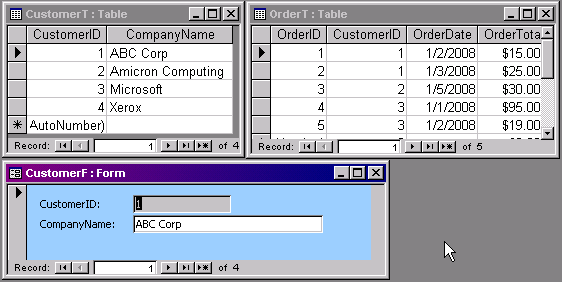
click image to enlarge
You can build a query that says "only show me the order records for the currently open customer" like this:
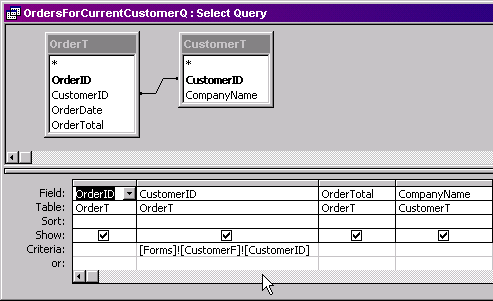
click image to enlarge
Now, as long as your customer form is open and you run this query - or any other reports or forms that are based on it - you will see only the orders for the currently open customer. You can do the same thing with a form, basic listbox, and a button to open another query:
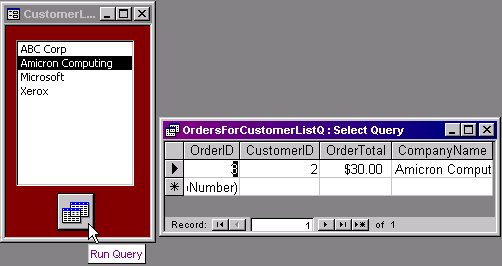
click image to enlarge
Example:
[Forms]![Check QC Project set up]![Text3] --- this will extract data from the field name Text3 which is in the form Check QC Project set up.
Example in terms of SQL Query:
SELECT AMEX_FEED_MANAGEMENT_02222015.[QC Domain Name],
AMEX_FEED_MANAGEMENT_02222015.[QC Project Name]
FROM AMEX_FEED_MANAGEMENT_02222015
WHERE (((AMEX_FEED_MANAGEMENT_02222015.[QC Project Name])
Like ([Forms]![Check QC Project set up]![Text3] & "*")));
